Nakivo

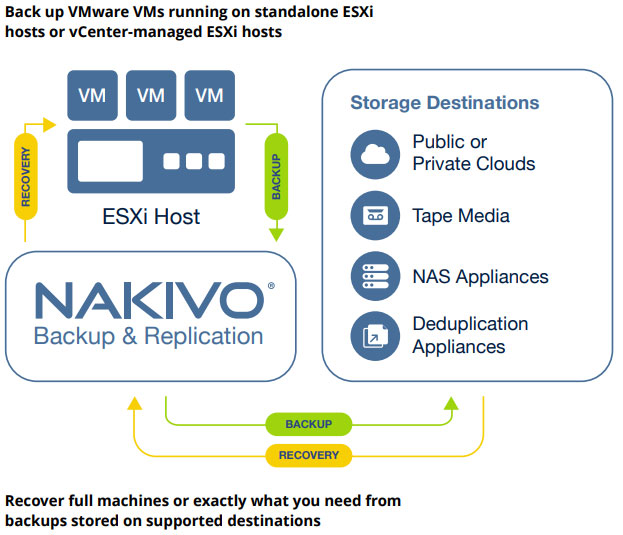
Protecting your virtual infrastructure doesn’t have to be complicated or expensive. Developed specifically for VMware vSphere, NAKIVO Backup & Replication is simple, efficient and cost-effective.

How It Works?

Image-Based

An agentless solution that creates a backup, that is, a point-in-time copy, of a VM, including it’s guest OS disks, configuration files and applications without affecting the performance of source VMs

Incremental

Relying on the VMware Changed Block Tracking (CBT), the software copies only the blocks of data that have changed since the last backup cycle for smaller and faster backups

Application-Aware

Data in applications and databases, such as Microsoft Exchange, Active Directory and Microsoft SQL, Oracle Database and SharePoint, remains transactionally consistent so apps can be started immediately.

Features

Advanced VMware Integration

NAKIVO Backup & Replication always supports the latest versions of vSphere. With support for vSphere 7, you can take advantage of VMware’s newest functionality and ensure that your VMs are protected.

One Solution, One Interface

NAKIVO Backup & Replication offers a full range of backup features for virtual and mixed environments, including backup, replication, instant granular restore, and site recovery for virtual, cloud, physical and SaaS environments, all managed from a centralized web interface

Simple Administration

Set policy rules for automated VM backups based on a VM’s name, tag, size, etc. Matching VMs are automatically added to corresponding jobs or excluded from them

Easy and Quick Deployment

Install in minutes on Windows, Linux or NAS, or deploy as a VMware virtual appliance and get started with VM protection right away

Global Deduplication

Global deduplication across an entire repository – regardless of the source of data – improves VM backup performance and lowers costs for long-term data retention.

Low Total Cost of Ownership

Two licensing models for VMware infrastructures are available to fit the budget of organizations of any size: perpetual (priced per socket) and subscription (priced per workload).

Do More with NAKIVO Backup & Replication

Disaster recovery features for VMware environments:

  • Replication – Create an identical copy of your source VMs. For convenience, you can automate replication jobs.
  • Replication from Backup – Perform replication directly from VMware backups.
  • Replica Verification – Instantly verify VM replicas and get a report with screenshots of the test-recovered VMs.
  • Automated VM Failover – Resume your mission-critical workloads within minutes by failing over to a VM replica.
  • P2V Recovery – Boot VMware VMs directly from physical machine backups for instant restores, sandbox testing,
    or safe physical to virtual migrations.
  • Site Recovery – Create disaster recovery workflows to be prepared for any failure scenario in advance.
    Perform non-disruptive recovery testing at any time.